
Each Post Meta Description for Blogger Blogspot
Posted by anonymous in Blogspot tricks, Web Developer tricks on Wednesday, July 14, 2010
How to create different meta description and meta keywords in every single posts/articles/pages automatically in blogger blogspot using blog post titles.
To achieve better SERP and SEO, each and every articles we write in our blog has to have its own meta description which should be different with that of mainpage’s. This can be easily done in a self-hosted wordpress blog: All in One SEO Pack or Platinum SEO Pack plugins will do the task. Not for a blogger blogspot hosted blog.
There are some few hacks to do this in blogger blogspot. The following hack is the one I like the most and I used for my blog.
Here is how to do it:
1. Login to your blogger.com -> Layout -> Edit HTML
2. Copy and Paste the following code, and put it immediately after <head>
<b:if cond='data:blog.pageType == "index"'>
<META CONTENT='Just another tech blog.Full with tips and tricks to
make your life easier.Download,Know and share with your friends' NAME='Description'/>
<meta content='computer,software,review,developer,Mobile,Code,
snippet,Full,hollywood,english,bangla,hindi,movie,jave,sis,wallpaper,picture,
games,animations,sis,jar,jad,nth,thm,jpg,gif,
exe,deb,png,ico,nokia,iphone,samsung,python,php,script,
bash,ubuntu,xp,vista,sms,mms,picture,message,rpm,free,download' name='keywords'/>
<b:else/>
<meta expr:content='data:blog.pageName + " – Just another tech blog.Full with tips and tricks to make your life easier download,Know and share with your friends "' name='description'/>
<meta expr:content='data:blog.pageName + " computer,software,review,developer,Mobile,Code,
snippet,Full,hollywood,english,bangla,hindi,movie,jave,
sis,wallpaper,picture,games,animations,sis,jar,jad,nth,thm,jpg,gif,exe,
deb,png,ico,nokia,iphone,samsung,python,php,script,
bash,ubuntu,xp,vista,sms,mms,picture,message,rpm,free,download "' name='keywords'/>
</b:if>
3. Change the meta content description and keywords as you like.
4. Click Save Template
Functionality:
1. When search engine visits the main page, it will show the main page meta description and keywords
2. When search engine visits a particular page / post / article, it will show the title as its meta description and meta keywords. Thus different from the main page.
You can view my site for demo...
To view the source click the right button click "view page source" for firefox user
Read more ...
To achieve better SERP and SEO, each and every articles we write in our blog has to have its own meta description which should be different with that of mainpage’s. This can be easily done in a self-hosted wordpress blog: All in One SEO Pack or Platinum SEO Pack plugins will do the task. Not for a blogger blogspot hosted blog.
There are some few hacks to do this in blogger blogspot. The following hack is the one I like the most and I used for my blog.
Here is how to do it:
1. Login to your blogger.com -> Layout -> Edit HTML
2. Copy and Paste the following code, and put it immediately after <head>
<b:if cond='data:blog.pageType == "index"'>
<META CONTENT='Just another tech blog.Full with tips and tricks to
make your life easier.Download,Know and share with your friends' NAME='Description'/>
<meta content='computer,software,review,developer,Mobile,Code,
snippet,Full,hollywood,english,bangla,hindi,movie,jave,sis,wallpaper,picture,
games,animations,sis,jar,jad,nth,thm,jpg,gif,
exe,deb,png,ico,nokia,iphone,samsung,python,php,script,
bash,ubuntu,xp,vista,sms,mms,picture,message,rpm,free,download' name='keywords'/>
<b:else/>
<meta expr:content='data:blog.pageName + " – Just another tech blog.Full with tips and tricks to make your life easier download,Know and share with your friends "' name='description'/>
<meta expr:content='data:blog.pageName + " computer,software,review,developer,Mobile,Code,
snippet,Full,hollywood,english,bangla,hindi,movie,jave,
sis,wallpaper,picture,games,animations,sis,jar,jad,nth,thm,jpg,gif,exe,
deb,png,ico,nokia,iphone,samsung,python,php,script,
bash,ubuntu,xp,vista,sms,mms,picture,message,rpm,free,download "' name='keywords'/>
</b:if>
3. Change the meta content description and keywords as you like.
4. Click Save Template
Functionality:
1. When search engine visits the main page, it will show the main page meta description and keywords
2. When search engine visits a particular page / post / article, it will show the title as its meta description and meta keywords. Thus different from the main page.
You can view my site for demo...
To view the source click the right button click "view page source" for firefox user
How to add meta tags into your blog
Posted by anonymous in Blogspot tricks, Web Developer tricks
Do you want to improve your blog value, get more hits, and rank high on search engines? Then you must optimize how your blog is indexed in a search engine.
While there are lots of factors involved in building quality blogs that can draw huge traffic in, having simple things right in the beginning is as important. One of this simple thing is getting your blog indexed properly with the right description & keywords to optimize search engine rankings (known as Search Engine Optimization or SEO).
To get information, search engines use automated software agents called spiders, crawlers, robots, or bots to collect the a few words from a site or blog (typically the URLs, blog name, and blog description, and maybe some words in the early part of sentences or paragraphs) that will later be used as keywords to index the blog.
Because you cannot be certain which words are taken as keywords pertaining to your blog, it's most likely that your blog won't be indexed properly in search engines - in the worst case, your highly relevant keywords might not even be used to index your blog. When this happen, searches on keywords relevant to your blog may have your blog buried at the far end of the list of thousands and millions of pages. What a waste!
To have a control of what is read by crawlers on your blog to be indexed, you have to build what is called a META tag - basically a bunch of words that makes up the most relevant description and keywords of your blog. If the META tag exist, this is what the crawlers will read and index and get displayed on any searches related to your keywords.
Here's what a search on my blog looks like on Google. The description is exactly the one I have written in the META tag. The 1st search on the list shows the new META tag description that was made a few seconds before the snap. The old META tag is shown beneath it (22 hours ago).

There are basically 2 parts to a META tag: first is the META description and second is the META keywords. The description are what appears on a search. As you can see, if the description is too long, it'll be cropped as search engines only use a few lines to describe the blog. An optimum number of characters to use for META description is 150 (including spaces and dots).
For META keywords, you can use as many words as you want, but don't repeat the same word too many times (more than 5) to avoid keyword spam. Crawlers can identify keyword spamming easily - which won't make it good either for SEO.
To create a META tag, simply copy the code below and rewrite your META description and keywords (the red text):
Then, place it in between the
For more details:Go to this Free META Tag Builder tool. It directs you easily to build a META tag, create the HTML or XHTML code, and guides to paste it into your blog template XML code.
Just for the fun of it, you can analyze your blog's original description and keywords by submitting your blog URL at the Free META TAG Analyzer before placing the new META tags in your blog - so that you can compare how it is indexed before and after the change.
Read more ...
While there are lots of factors involved in building quality blogs that can draw huge traffic in, having simple things right in the beginning is as important. One of this simple thing is getting your blog indexed properly with the right description & keywords to optimize search engine rankings (known as Search Engine Optimization or SEO).
To get information, search engines use automated software agents called spiders, crawlers, robots, or bots to collect the a few words from a site or blog (typically the URLs, blog name, and blog description, and maybe some words in the early part of sentences or paragraphs) that will later be used as keywords to index the blog.
Because you cannot be certain which words are taken as keywords pertaining to your blog, it's most likely that your blog won't be indexed properly in search engines - in the worst case, your highly relevant keywords might not even be used to index your blog. When this happen, searches on keywords relevant to your blog may have your blog buried at the far end of the list of thousands and millions of pages. What a waste!
To have a control of what is read by crawlers on your blog to be indexed, you have to build what is called a META tag - basically a bunch of words that makes up the most relevant description and keywords of your blog. If the META tag exist, this is what the crawlers will read and index and get displayed on any searches related to your keywords.
Here's what a search on my blog looks like on Google. The description is exactly the one I have written in the META tag. The 1st search on the list shows the new META tag description that was made a few seconds before the snap. The old META tag is shown beneath it (22 hours ago).

There are basically 2 parts to a META tag: first is the META description and second is the META keywords. The description are what appears on a search. As you can see, if the description is too long, it'll be cropped as search engines only use a few lines to describe the blog. An optimum number of characters to use for META description is 150 (including spaces and dots).
For META keywords, you can use as many words as you want, but don't repeat the same word too many times (more than 5) to avoid keyword spam. Crawlers can identify keyword spamming easily - which won't make it good either for SEO.
To create a META tag, simply copy the code below and rewrite your META description and keywords (the red text):
<meta content='text/html; charset=utf-8' http-equiv='Content-Type'/>
<meta content='Write your META description here. Keep it less than 150 characters.' name='description'/>
<meta content='Write your META keywords here as many as you want separated with commas. Keep word repetition less than 5 to avoid keyword spamming.' name='keywords'/>
Then, place it in between the
<head> ..... </head> section near the top part of your template XML code. It's best to put it just below the <title><data:blog.pageTitle/></title> code.For more details:Go to this Free META Tag Builder tool. It directs you easily to build a META tag, create the HTML or XHTML code, and guides to paste it into your blog template XML code.
Just for the fun of it, you can analyze your blog's original description and keywords by submitting your blog URL at the Free META TAG Analyzer before placing the new META tags in your blog - so that you can compare how it is indexed before and after the change.
How to restart apache on ubuntu
Posted by anonymous in ubuntu, ubuntu command on Monday, July 12, 2010
To restart apache on ubuntu follow the following steps
>>Start gnome-terminal
>>Type
If you are using another version of apache replace "apache2" with your apache software name
Read more ...
>>Start gnome-terminal
>>Type
If you are using another version of apache replace "apache2" with your apache software name
How to create a favicon icon
Posted by anonymous in Blogspot tricks, Web Developer tricks, Web tips and tricks
Blogger or web developer what ever every one needs to designe a favicon icon for their site.
It works just like a logo.When a user bookmark the page the icon will be beside the book mark.
What is favicon icon:
Look at the location bar and you will see a icon.It is called the favicon icon.
If you are not a professional blogger or web developer and don't know about adobe photoshop or other graphics software and designe a icon for you it is the right palce for you.
We will descrive about a web based tool which generate a favicon icon on the basis of your given pitcure file
So lets start the journey how to do....
Go to this address
FAVICON GENERATOR
You will see a page looks like this:

Follow their instructions and make a icon for you web site or blog
How to integret it to the web site:
At first upload it to your web site or any image hosting server.Like picasa,Or any other image hosting
Then add the above code before "</head>" on your web page
Replace the "icon url" with your icon location Ex:http://picasa.com/favicon.ico
And now Save the page
And you will see Your favicon icon
Read more ...
It works just like a logo.When a user bookmark the page the icon will be beside the book mark.
What is favicon icon:
Look at the location bar and you will see a icon.It is called the favicon icon.
If you are not a professional blogger or web developer and don't know about adobe photoshop or other graphics software and designe a icon for you it is the right palce for you.
We will descrive about a web based tool which generate a favicon icon on the basis of your given pitcure file
So lets start the journey how to do....
Go to this address
FAVICON GENERATOR
You will see a page looks like this:
Follow their instructions and make a icon for you web site or blog
How to integret it to the web site:
At first upload it to your web site or any image hosting server.Like picasa,Or any other image hosting
Then add the above code before "</head>" on your web page
<link rel="shortcut icon" type="image/x-icon" href="icon url">Replace the "icon url" with your icon location Ex:http://picasa.com/favicon.ico
And now Save the page
And you will see Your favicon icon
Blogger Stats on your Blogger Dashboard
Posted by anonymous in Blogspot tricks, Web tips and tricks on Sunday, July 11, 2010
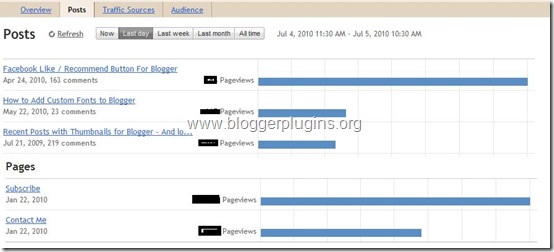
Many of you might have been using Google analytics or some third party tracking scripts for monitoring your blog statistics. Now blogger has made it much easier for you. You can now get the stats right in your dashboard without adding any extra widgets or codes to your template. This feature is not yet available on your regular dashboard. This is only available on the Blogger in Draft Dashboard.



Read more ...
“The coolest thing about the new Blogger Stats is that it monitors and analyzes your visitor traffic in near-real-time. You can see which posts are getting the most visits and which sites are sending traffic to your blog right now. For example, if a reader shares one of your blog posts on Twitter and the post is getting lots of clicks, you will see a traffic increase in Blogger Stats almost instantly, with the particular Tweet mentioning your post being identified as the traffic source. Of course, traffic data across longer time periods (day/week/month) and all-time historical data are available as well.”The stats will keep track of the popular keywords,countries where the visitors come from,web browsers used by the visitors and lots more.
Source : (Official blogger in Draft Blog)
“Note that the page view data in Blogger Stats and in Google Analytics may not be identical, due to different collection mechanisms used. Also, Blogger Stats do not support private blogs for now.”
Source : (Official blogger in Draft Blog)
How to See My Blog Stats?
- Blogger Stats is Currently available on the Blogger in Draft Dashboard only. So login at http://draft.blogger.com
- Now Click on the Stats Link Next to your Blog


